4 Ways The Google Pixel Phone Home Screen Could Be Improved
Google’s Pixel phones have long been praised for having the best software in the smartphone market. With the release of Android 16 on the Pixel 10 Pro XL, Google has once again solidified its position as a software powerhouse. Even Apple’s iOS 18 falls short in comparison, and it’s unlikely that iOS 26 will be able to catch up.
The Pixel 10 series offers a slick, intuitive, and easy-to-use software experience that is unrivaled. Minimal bloatware, seamless integration with Google apps and services, prompt updates, monthly patches, and an impressive seven years of software support make it a top choice for Android users.
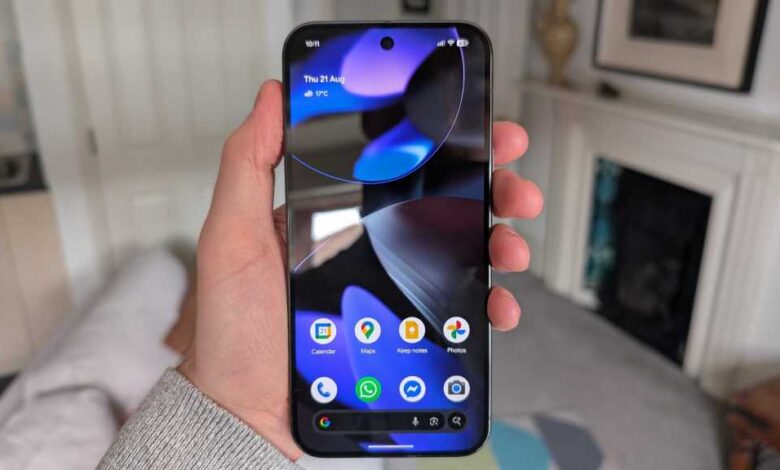
However, despite its many strengths, there is one area where Google seems to be neglecting: the home screen. The home screen is the first thing users see when they unlock their phones, yet Google’s approach to it leaves much to be desired.
One of the biggest frustrations with the Pixel home screen is the inability to remove or customize the ‘At a Glance’ widget. While the widget provides useful information like the date, weather, calendar events, and more, it cannot be removed or rearranged. This lack of flexibility hampers the overall user experience and limits customization options.
Similarly, the prominent search bar at the bottom of the screen feels unnecessary and takes up valuable screen real estate. While Google may want to promote its search engine, the search bar often goes unused and can lead to accidental presses.
Additionally, the labeling of app icons on the home screen feels redundant. Users who have familiarized themselves with app icons over time do not need labels cluttering up the screen. Providing the option to toggle off app labels would allow for a cleaner and more personalized home screen experience.
Lastly, the lack of visually appealing first-party widgets on the Pixel home screen is a missed opportunity. While functional, the widgets offered by Google lack the polish and aesthetic appeal found on other devices like Samsung Galaxy phones running One UI 7 or 8.
In conclusion, while the Pixel excels in many aspects, there are clear areas where Google can improve the home screen experience. By allowing for more customization options, removing unnecessary elements, and enhancing the visual appeal of widgets, Google can further solidify its position as a leader in smartphone software.