How to Switch SIMs on iPhone, Including eSIM
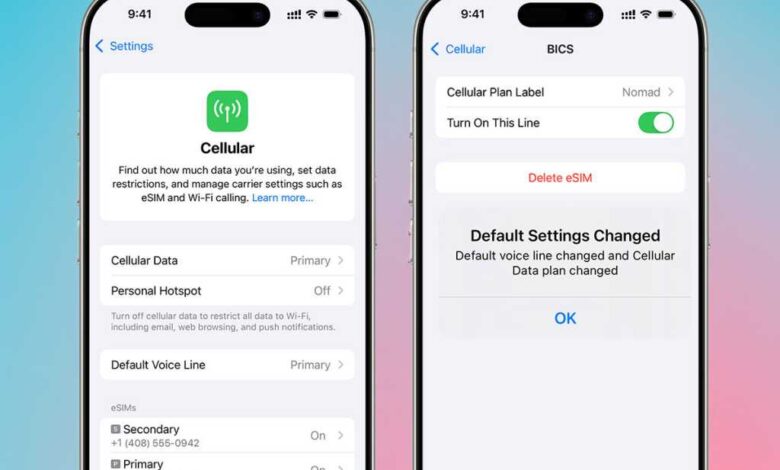
Switching eSIMs on your iPhone can be a hassle-free process compared to dealing with physical SIM cards. With eSIM technology, you can easily switch between different mobile service providers without the need for a SIM tray tool or a paper clip. Here’s a step-by-step guide on how to switch an eSIM on your iPhone:
1. Open the Settings app on your iPhone by tapping on the grey app icon with cog wheels.
2. In the Settings menu, locate the option “Cellular” in the US or “Mobile Service” in the UK, and tap on it.
3. On the Cellular or Mobile Service page, you will find a section labeled “SIMs” where your eSIMs and primary SIM (if you have one) are listed.
4. Choose the eSIM that you want to enable or disable by tapping on it. You can switch between eSIMs by turning them on or off using the toggle switch.
5. Toggle the switch to the green position to enable the eSIM or to the grey position to disable it. Disabling an eSIM will turn it off but won’t delete it from your device.
6. Keep in mind that only two eSIMs can be active at a time on your iPhone. If you have more than two eSIMs installed, you will be prompted to turn one off before activating another.
7. Once you have selected and enabled the desired eSIM, you are all set to use it for your mobile services.
eSIMs offer a convenient way to manage multiple mobile service providers on your iPhone, making it easier to switch between them as needed. Whether you are looking to avoid hefty roaming charges while traveling or simply want to explore different service options, eSIM technology provides flexibility and convenience.
If you are interested in exploring the best eSIM options for your needs, consider researching the best eSIMs for various purposes such as travel, business, security, and more. Setting up and using an eSIM on your iPhone can open up a world of possibilities for your mobile connectivity needs.