Samsung Galaxy Z Flip 7 Live Diary: Unboxing, Setup & Early Impressions
Samsung has recently unveiled three new folding phones, including the Galaxy Z Fold 7 and the Galaxy Z Flip 7. In this article, we will take a closer look at the Galaxy Z Flip 7 as we document the first 48 hours of using the device.
Day 1, Hour 0:
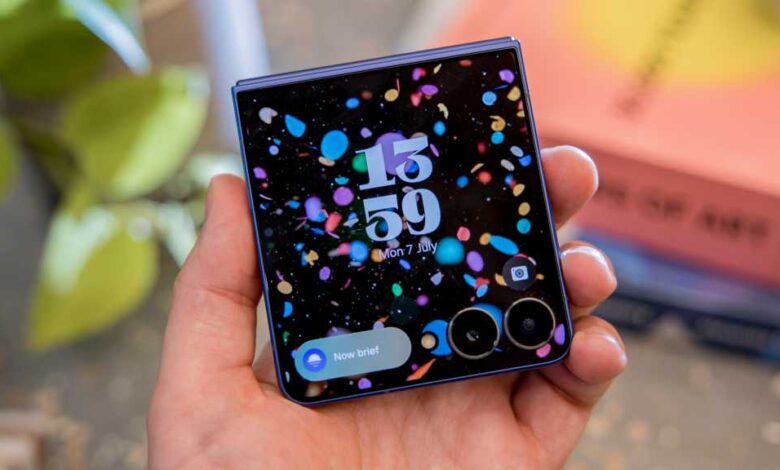
Upon unboxing the Galaxy Z Flip 7 in the ‘Blue Shadow’ color variant, I was immediately drawn to the new cover screen, which Samsung refers to as the ‘FlexWindow’. The box contained minimal accessories, with no power brick included. Setting up the device was straightforward, although I encountered some issues with the wireless transfer of data from my previous phone.
Day 1, Hour 1:
During the initial setup, I experienced a delay in restoring my data and found unwanted pre-installed apps on the device. Despite these minor setbacks, I proceeded to explore the functionality of the cover screen for taking selfies and adjusting settings.
Day 1, Hour 2:
As I prepared to attend a pub quiz, I appreciated the compact size of the Galaxy Z Flip 7 and the convenience of the cover display for quick tasks. The device easily fit in my pocket, making it a practical choice for daily use.
Day 1, Hour 5:
While at the pub quiz, I marveled at the large internal display of the Galaxy Z Flip 7 and its potential for immersive content consumption. The evening passed without significant phone usage, allowing me to appreciate the device’s portability and versatility.
Day 2, Hour 15:
The lightweight nature of the Galaxy Z Flip 7 stood out as I went about my morning routine. The fingerprint sensor on the power button proved to be efficient for unlocking the device seamlessly. Despite its slim profile, the phone packed impressive features for everyday use.
Day 2, Hour 19:
After a busy work morning, I noticed the slow charging speed of the Galaxy Z Flip 7, which required over two hours for a full charge. The 4300mAh battery capacity seemed inadequate compared to other smartphones on the market, highlighting a potential drawback of the device.
Day 2, Hour 20:
Exploring the limitations of the cover screen, I found that third-party apps had limited functionality. However, with a workaround provided by Samsung, I was able to customize the display and optimize app usage. The device’s adaptability and customization options enhanced its usability and made it more versatile for everyday tasks.
In conclusion, the first 48 hours with the Galaxy Z Flip 7 provided insights into its design, performance, and features. Stay tuned for the full review to uncover more about this innovative folding phone from Samsung.